
satellites signal quality checking


  • Hello, I am a software engineer from USA, and I bought your product K803 module. May I know how to check the satellites and signal quality information of the GNSS module?


  • Hello,  I am Will from Qtalis.

    You can use our software CRU to visualize the SNR of each satellite.

    After connecting the module via the serial port, simply click the “Tracking” tab in the software. You will then be able to view the SNR values of each satellite along with a corresponding bar chart, which makes it easy to evaluate signal quality at a glance.
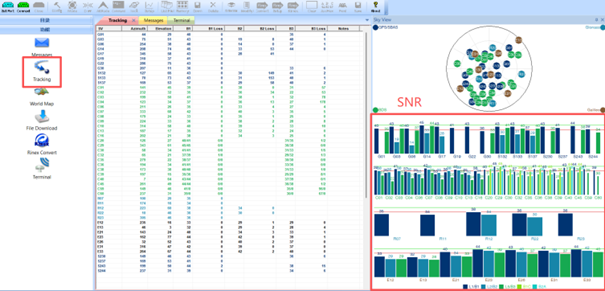


  • Thank you for your reply, it’s very helpful. Are there any related messages that I can use to extract these values?


  • @amor fati

    Yes certainly.

     you can check satellite information and signal quality by requesting NMEA messages via the serial port. One of the most commonly used messages is GPGSV.

    The GPGSV message provides details about all visible satellites, including the number of satellites in view, each satellite’s PRN number, elevation, azimuth, and most importantly, the SNR (Signal-to-Noise Ratio).

    In simple terms, you can think of this message as giving each satellite a “signal score,” allowing you to quickly identify which satellites have strong signals and which ones are weaker.

    Here is an example of a typical GPGSV message:

    $GPGSV,3,1,12,02,33,240,46,05,23,140,38,07,41,095,32*7F

    In this message, every group of four values represents one satellite:

    • 02,33,240,46: PRN 02, elevation 33°, azimuth 240°, SNR 46 dB-Hz
    • 05,23,140,38: PRN 05, elevation 23°, azimuth 140°, SNR 38 dB-Hz
    • 07,41,095,32: PRN 07, elevation 41°, azimuth 95°, SNR 32 dB-Hz

    More details you can find in our module reference manual.

    If you are using a dual-antenna receiver, you can also check the SYSRTS message for additional signal quality information.

    If you need further details, feel free to let me know.


  • Thanks for your explanation. I’m currently using the K803 module as both base and rover for RTK. Is it possible to check the satellite signal quality for both at the same time?


  • Hello, yes, that’s possible.

    The SYSRTS message not only provides signal quality information for the primary and secondary antennas in dual-antenna setups, but it can also be used to monitor the signal quality of both the base station and the rover.

    Here is an example message:

    $SYSRTS,121437.00,094339.00,40,15,0,AT,46,94,1,4,28,,,,,,45,94,32,M,SURVEY,0,,,0,9,2200,11,9,32,,,,*70

    • The 8th field (46) represents the average satellite SNR of the rover (main antenna)
    • The 18th field (45) represents the average satellite SNR of the base station

    This allows you to quickly compare signal quality between the base and rover in real time.

    If you need help interpreting other fields in the message, feel free to ask.


Please login to reply to this topic!